Preface
I have three sites that are connected via IPSec site-to-site VPN. They are connected in a hub-spoke topology. Specifically it looks like this:
remote site A <- VPN -> main site <-> remote site B
There is no direct connection between the two remote sites. Previously hosts on remote sites can only talk to the hosts on the main site, they cannot talk to hosts on the other remote site. In other words, transitive communication wasn’t working.
This document shows how you can modify the IPSec VPN configurations to allow transitive communications between remote sites via the main site.
Background
pfSense firewall is deployed on the main site and remote site A, Mikrotik routerboard (running RouterOS) is deployed on the remote site B.
Current setup is that a site-to-site VPN tunnel is established between remote site A and main site, and another tunnel between remote site B and main site.
Both IPSec tunnels have the configuration that includes one Phase 1 and one Phase 2.
Communications between the following parties are working:
- Remote site A <–> main site
- Remote site B <–> main site
IP addresses for all sites:
- remote site A: 192.168.1.0/24
- remote site B: 192.168.2.0/24
- main site: 192.168.101.0/24
Routing
The routing information regarding the networks that are connected via IPSec VPN cannot be checked by viewing the routing tables from either pfSense or RouterOS.
The firewall devices know where to route the traffic by looking at the Phase 2 configuration inside the IPSec VPN configuration. Specifically the local and remote network settings in Phase 2 tells the firewall devices if the traffic needs to be forwarded through IPSec VPN tunnel.
IPSec VPN changes needed to facilitate the transitive communications between remote sites via main site
Add additional Phase 2 configuration to the existing Phase 1 configuration on all three firewall devices.
For pfSense @ remote site A

Note that the 2nd Phase 2 was added to tell pfSense @ remote site A that all traffics destined to 192.168.2.0/24 should be forwarded through IPSec VPN tunnel to the main site
For Routerboard @ remote site B
/ip ipsec policy
set 0 disabled=yes
add dst-address=192.168.101.0/24 peer=main.johnmen.com proposal="main.johnmen.com SA proposal" src-address=192.168.2.0/24 tunnel=yes
add dst-address=192.168.1.0/24 peer=main.johnmen.com proposal="main.johnmen.com SA proposal" src-address=192.168.2.0/24 tunnel=yes

Note that the 2nd policy was added here to tell RouterOS @ remote site B that all traffics destined to 192.168.1.0/24 network should be forwarded through IPSec VPN tunnel to main site
For pfSense @ main site
2nd Phase 2 added for IPSec VPN to remote site A:

2nd Phase 2 added for IPSec VPN to remote site B:

Firewall rules needed to allow transitive communications
Other than adding Phase 2 configurations to the IPSec VPN on all firewall devices, the firewall portion of all firewall devices also needs to have rule added to allow transitive communications.
For remote site A
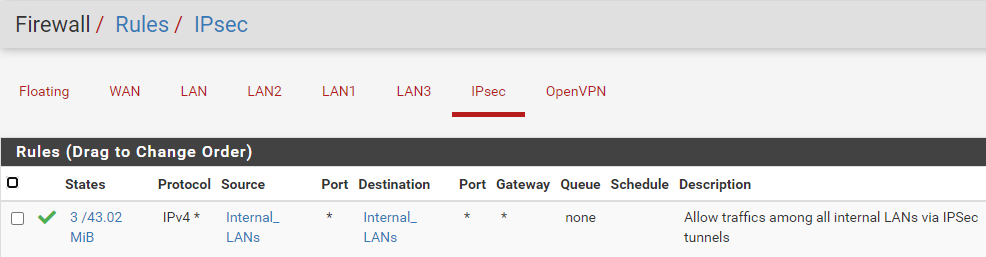
Firewall alias:

For remote site B
/ip firewall address-list
add address=192.168.1.0/24 list=Internal_LANs
add address=192.168.2.0/24 list=Internal_LANs
add address=192.168.101.0/24 list=Internal_LANs

/ip firewall filter
add action=accept chain=forward dst-address-list=Internal_LANs src-address-list=Internal_LANs
For main site
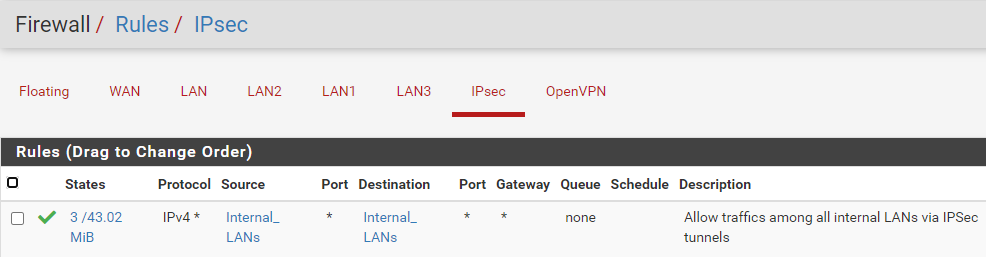
Firewall alias
